Showing posts with label Android. Show all posts
Again it's me Santhosh kumar aka fojoheartthrobe guys. Wazzup? Lets get to the article right away.
I always wanted to design a responsive theme for the blog, so that without the need of an application the blog would look like an app within your browser. Because when viewed via the app the views don't get hit. But still some of the audiences asked me because they wanted to read articles offline when they are away from their wifi. So here it goes the updated version. Wait.. what? updated?. 
Yes guys, the app I made is not new. I have already done it a year ago or so. But as I said since i don't get the traffic while using the blog's post as a rss feed reader, I totally removed the posts and all other things related to the PazSan android app that I made earlier,

Here are some screen shots of the app.

The PazSan logo

The app provides a wide range of language support

Settings to play around with sync, notifications, spaces and else

Notifications in the status bar for every single post

Dedicated notification settings

The all time favorite offset swipe layout

Star your favorite articles

A neat grid view of the posts
Beautifully crafted widget for a selected category
I think all the above screen shots are self explanatory. Sure give it a try for the work put into it. There are two themes built in. Not more than two because the idea was White theme to use at day time and a Black theme to use at night times so that the display won't burn your eyes.

Click here to download
Hey guys Whats up? It's Santhosh kumar again. Good to see you guys supporting my blog. Since a full time blogger I had to design some themes for the blog to improve the looks and the performance and i'm trying to keep the responsive blog templates. I have already made an android app which if you might have missed, let me know in the comments below and I'll share the link. I'ts available in the blog itself. Just search PazSan app.

Now coming ot the point. A lot of times I've had troubles connecting to google Play Store saying that "No connection" or "Server timed out". This is because of the Host file in the system directory of your ROM. So by now you must have known this article is only for the root users. My previous article also for the root users. Don't worry  I'll get my camera in a couple of weeks. And from then on I will make a lot of vids  for YT. Meanwhile some of my friends will be writing stuff here.

However my previous article was also with a similar issue. I was asked to rewrite the article so that people could find it easily with the tags. So here it goes.

The app might open and keep loading for ever. For example you can't sign into google, you can't use gmail app, you can't use the calendar, and so and so. And my nightmare being the youtube app which won't load. Some might find alternative apps for the above said apps like I did when I din't know the solution. The most important thing is that Google Play Store will not load at all. You will get server timed out error. So here's the fix.


Fix:
All you need to do is to add a character in the second line of the hist file which exists in the system\etc in the root directory. I'll put on a step by step procedure on how to do so.

STEP 1:
Get any root file explorer for you device from playstore. If the playstore doesn't work find the apk online and install it.
I personally use MiXplorer which I got from XDA forums. Most of you might use the Root explorer app. Both will work fine.

Just in case you don't know about MiXplorer click here to learn more about the features and why I use it.

STEP 2:
If you are using MiXplorer, swipe from the left to right of the screen and find the label ROOT in the list. When you touch it you will be prompted for the root access. Just provide like you do for other apps. How you navigate to the root folder depends on the file explore you are using. In Root explorer this could be a bit cumbersome for the new users.

STEP 3:
Navigate to " system->etc " and find the file named hosts and open it as a text file.

STEP 4:
You will find some lines of ip address in them.
On the second line, add "#" without quotes.

before edit:
127.0.0.1      localhost
127.81.104.152 android.clients.google.com

after edit:
127.0.0.1      localhost
#127.81.104.152 android.clients.google.com.

Save it and reboot the phone. Now you will have every google apps working and you need not find any alternative apps for the ones offered by google.

Hi guys this is my third article on a single day feeling happy to do so since I turned a full time blogger.
OnePlus Two Specs, Features
You might end up here with this article only if you know about OnePlus One I think. We all know how great was and is the Chinese manufacturer's OnePlus One, still being a year old. That was why the phone got the popularity, providing the best price to performance ratio. I don't know about the mentality of the people in other countries, but in India, price is a very sensitive matter. Putting into simple words, India is the most highly price sensitive market. And at the same time there are a lot of people who are brand loyal and only go for highly famous and branded phones. Still OnePlus managed to surprise the consumers in India with a considerable price for a single SIM device and steal the hearts of the brand loyals. While I was worrying about the invite system that OenPlus used to sell their product, they surprisingly removed the invite system for the OnePlus One.

The specs:

OnePlus-A2003-specs-leak-1
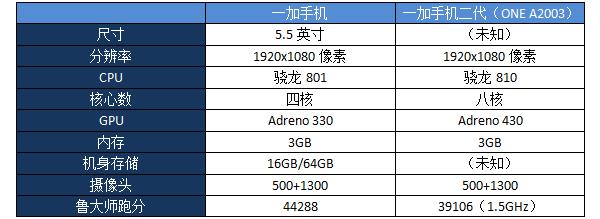
The specs of the OnePlus device was leaked the last Thursday which were beastly. The model number of the phone was found to be "A2003". The name of the devicce has not been confirmed that it's a OnePlus Device. But relating the specs to what CEO of OnePlus said in an interview, they come close. 
The phone has 3GB of RAM with a 64Bit Snapdragon 810 processor with Adreno 430 GPU. The scree size and the resolution remaining the same the internals are getting stronger. The camera is expected to be Sony's 20MP sensor with OIS.
The price of this phone will be around $400.

Will I go for this?

Sure i would love to give phone a try. But this could never be my daily driver unless it has a dual sim setup and expansion memory. Life for me without two sim cards is almost impossible. And therefore I will be using the Zenfone 2 offering from Asus. The only reason I don't use OnePlus One is the lack of dual sim and memory expansion. Also in terms of performance the zenfone 2 is + or - 0.5 than the OnePlus One. So the choice of selecting is totally dependent on your life style. Let's wait for the confirmed specs.

Hi guys wazup. This is Santhosh kumar back again with an android article. In the previous article I wrote about fixing the grey wifi bars in android. Fixing that requires rooting your device. So for people who do not know what rooting means, this article will help.

In simple words:

Without being technical if I should put in simple words, "You just have the phone and you don't own the phone until you root it". In other words, android device comes with tons of features which are hidden from the normal users (unrooted users). If you root the phone you now own the phone and also authenticated to access all the features that android serves it's users.

Technical:

Rooting is required for more advanced and potentially dangerous operations including modifying or deleting system files, removing carrier- or manufacturer-installed applications, and low-level access to the hardware itself (rebooting, controlling status lights, or recalibrating touch inputs.) A typical rooting installation also installs the Superuser application, which supervises applications that are granted root or superuser rights by requesting approval from the user before granting said permissions. A secondary operation, unlocking the device's bootloader verification, is required to remove or replace the installed operating system.
In contrast to iOS jailbreaking, rooting is not needed to run applications distributed outside of the Google Play Store, sometimes called sideloading. The Android OS supports this feature natively in two ways: through the "Unknown sources" option in the Settings menu and through the Android Debug Bridge. 
To be more technical exploiting one or more security bugs in the firmware of (i.e., in the version of the Android OS installed on) the device.

Advantages:

The advantages of rooting cannot be put into numbers, But some useful features would be like,
Expanding your RAM.
Expanding your internal memory.
Changing your operating system.
Remove bloatwares. Bloatwares are the software that come pre-installed with the device.
Move system apps to SD card.
Ability to theme your android device.
Control CPU clock speeds.
Overclock or under clock CPU.
Play around with system files which might end up in bricking your device.

Risks:

Your phone might brick at the process of rooting.
Your phone might stop working partially.
Your wifi or sim slots might stop working.
Your phone might overheat (CPU control).
Your phone might get stuck in a boot loop.
And much more.

Precautions:

Look into the website of your device's manufacturer.
Some manufacturers like HTC, Sony, Google and some others provide a tutorial on unlocking the bootloader of the phone which should be done in order to root. This is not the case for all the phones.
Be careful while clearing the cache and dalvik.
Read carefully and do as said in the forums.
One rooting method will not help for all the phones.
Be specific with your device.
If you are not the first to try the mods from xda or any other forums check the comments before using it for yourself.

Have a good day.
@fojoheartthrobe
Hi people happy to announce that I'm from today (23/04/2015) on, a full time blogger and I also have some plans to make video solutions and link them to the text in the posts i make. and video for this post will also be added soon. I'm waiting for my camera to be delivered. Alright now let's get to the point.
I have an android device for my personal use, my dad has a tablet and a phone and my mom has a tablet for their uses. We all experienced a similar problem with the wifi signal bars turning out grey and won't turn back blue. I initially had no idea of why that happens and read in some website that it has something to be tweaked in the part of tcp port numbers dealing in the wifi router and much more with almost one solution extending more than 5 pages involving codes to put in the command window. But don't scare I finally found a simple solution for the root users. Sadly this article is not for unroot users.
For android newbies who don't know what rooting is, read this article.

Why worry about grey bars:

The grey signal bars in android is an indication that google apps won't open in you device. Not literally. The app might open and keep loading for ever. For example you can't sign into google, you can't use gmail app, you can't use the calendar, and so and so. And my nightmare being the youtube app which won't load. Some might find alternative apps for the above said apps like I did when I din't know the solution. The most important thing is that Google Play Store will not load at all. You will get server timed out error. So here's the fix.

Fix:

All you need to do is to add a character in the second line of the hist file which exists in the system\etc in the root directory. I'll put on a step by step procedure on how to do so.

STEP 1:
Get any root file explorer for you device from playstore. If the playstore doesn't work find the apk online and install it.
I personally use MiXplorer which I got from XDA forums. Most of you might use the Root explorer app. Both will work fine.

Just in case you don't know about MiXplorer click here to learn more about the features and why I use it.

STEP 2:
If you are using MiXplorer, swipe from the left to right of the screen and find the label ROOT in the list. When you touch it you will be prompted for the root access. Just provide like you do for other apps. How you navigate to the root folder depends on the file explore you are using. In Root explorer this could be a bit cumbersome for the new users.

STEP 3:
Navigate to " system->etc " and find the file named hosts and open it as a text file.

STEP 4:
You will find some lines of ip address in them.
On the second line, add "#" without quotes.

before edit:
127.0.0.1      localhost
127.81.104.152 android.clients.google.com

after edit:
127.0.0.1      localhost
#127.81.104.152 android.clients.google.com.

Save it and reboot the phone. Now you will have every google apps working and you need not find any alternative apps for the ones offered by google.

If you have any difficulties please check the video below.
Give it a thumbs up if it helped you. Share the post and don't forget to subscribe my YouTube channel.
Hello guys this is Santhosh kumar back for a compact review of the Asus #zenfone2 pricing and the features.
I just saw the live streaming of the #Asus zenfone 2's launching ceremony online via facebook. This phone has created a very huge hype that got almost everybody's attention in the tech communities. The reason is the whooping 4GB of RAM. Yes you read it right It's a whooping 4GB of RAM which is included in the phone.

I was very eagerly waiting for the pricing of the phone because I got hyped more than Asus even. I got so excited that I sleep thinking of the releasing date in India and the pricing. That much mad is what i got into.

The phone features a massive 5.5 inch FHD (1920x1080) display which is a IPS one. So the clarity needs no words to explain the crispness of the display. The next feature is the screen to body ratio. It offers a screen to body ratio of 72% which makes the device feel like using a 5 inch device instead of making the user feel like holding a 6 inch phone in the hands.


When i wrote hands... this thing came into mind. The phone has a super curved arc back which provides a sleek design for the phone which also provides a great grip and hence the chances of slipping the phone from the hands is much lesser than any other phone out in the market. 

But don't worry about slipping the phone into your pockets. The phone fits very well into the pocket so that the phone does not feel big even though the screen size is 5.5 inch. The camera is another big feature that uses #PixelMaster technology which offers a very great low light photography shots.The PixelMaster technology provides photos that are 400 % brighter than other cameras.  Two photographers who are known for their works in the photography came to the launching ceremony of zenfone2 and they spoke about the camera features that this phone offered.

They even showed some shots took in Paris and India which came out to be very good. It's not just a mobile camera it offers the experience and control of a DSLR offerings.


The front camera is incredible too. The angle and the aperture offers  selfie panorama which will not miss out anybody in a #selfie or #groupfie. The back camera is 13 MP and front camera is 5 MP. 

Another feature I personally say is the #ZenUI. 


It offers much more optimizations for the smoothening of the phone and also enriched with customization facilities of the phone starting from theme of the launcher to font of the phone.


I found this personally very interesting because I personally neve have the stock android theme. I uses third party launchers or anything else. But Asus has helped persons like me to change everything. Or for changing some settings you might need to root your phone which will return "warranty void.". With zenfone you can natively customize the ZenUI.

The performance of the phone is not a problem indeed. 


The prime version of the phone houses an Intel 2.3 GHz quad core processor which is a 64 Bit one, PowerVR G6430 coupled with massive 4GB of RAM. With this Asus gets the name for producing the world's first 4GB RAM phone producer and Zenfone gets the name. 


The touch responsive is the fastest of all the phones out in the market : 60ms.

Finally the price point. Zeonfone 2 is being launched in India in 4 variants.

5.5" HD 2GB RAM 16GB Rs12999

5.5" FHD 2GB RAM 16GB Rs14999

5.5" FHD 4GB RAM 32GB Rs19999

5.5" FHD 4GB RAM 64GB Rs22999

These are the official rates announced by the CEO of Asus Mr.Jeff Chery if I'm not wrong.

Asus also unveiled a lot of other cool accessories for the zenfone 2 like zenflash, lolliflash, smart protection cover and much more. Soon I'll be writing posts about them. So stay tuned.

Will I go for it?

Yes defenitely I will go for this phone. For the specifications this phone offers the price is great and it is completely wort the money. The camera is however a let down. Still as days passed Asus pushed an OTA update which improved the camera performance a lot. Still not up to the mark like the OnePlus One. The camera also offers the digital stabilization which will only suppport 720p. For me these problems just didn't bother much because I hardly can pass one day without my two sim cards and the memory of OnePlus One is not at all enough for me. Still, there are some rumors about the next iteration of the OnePlus's device which will be relesed by Q4 of 2015. I can't wait till then. So I placed an order on Flipkart for the Zenfone 2.
@fojoheartthrobe
Hey guys this is Santhosh kumar and I'm writing this with complete gratitude and with immense pleasure.

Yes the big announcement that +OnePlus  made today is that they are getting rid of the invite system they were practicing in order to manage the risks of the new company. Now it's not new.

The company named OnePlus, yet another  installment from China made their company's first smart phone called One. The phone when initially released came with a tagline #TheFlagshipKiller and of course that phone was a real flagship killer providing the performance of a phone that is priced at around 60k for a price of 23k Inr. But India is very price sensitive market and at the same time many people were branding..

This phone just broke the branding prestige thing in the minds of several people and people actually loved the build quality, camera, RAM, and performance for this price.

This phone came to India exclusively via +Amazon India 's online store and used invite system.

The buyer has to have an invite code with him/her to buy the phone. A user cannot buy the phone from OnePlus unless he has an invite code to purchase the phone. This was really frustrating for people who did not have invites. Later last week OnePlus sent emails to top reviewers saying "from now on anything could happen". The CEO of OnePlus teased that they were working on a completely different gadget and the posters hinted the product to be a gaming device. It was almost trending in twitter. Many people though that could be OnePlus Two.

But actually what changed the game is that OnePlus announced that the farewell party is happening to the OnePlus one's invite system. Which means the company is now selling the phones to the users without having the need to have invite codes. Which is awesome. Users can buy the phone whenever they want without the need of an invite.

The company said initially that the company was trying to manage the number of orders for their new device. Because people who got the phones said that the manufactured date of the phone was after the date of placing the order and the package came straight from China. But now the company is selling out the phones to the customers. Maybe the company is preparing to launch the next flagship killer.

          Everybody knows nobody takes pride both in their flagship phones and the mid range devices more than HTC. Welcome guys this is Santhosh kumar writing the complete review for you about the HTC One M9. This phone has been a hot topic since the release of it's predecessor HTC One M8, one of my favorites of 2014. The only disappointment was the camera which provided only 4 megapixels which is actually 4 ultrapixels. HTC reinvented the camera with their own ultra pixel technology. Ultra pixel is a camera technology for mobile phones that offers a great photo even at very poor lighting conditions. Click here to learn more about the ultrapixel. With no further delay let's get started.

1. BUILD QUALITY:

            The build quality from a HTC one family has always been a enjoyable factor both in terms of the design and the sturdy feeling and this phone is no word changer for that. Comparing this build with the one of M8, the M9 has improved a little on reducing the slippery design that the users were so caring about in M8. Props to HTC in improving the build quality further more.


              The gold color is my personal preference of HTC One M9. This beautiful beast has a nice dual tone finish which provides a stand alone flagship feel when held in hands. The back provides a better grip than HTC one M8. Here in this case only the sides are glossy finished hence a good grip for the brushed gold look back of the phone. One handed usability is very good with this device. The flash lights are also dual tone.

2. DESIGN:

              The ergonomics of the phone are very very good for my likings. The phone feels pretty good and sturdy with the compact 5 inch display. (my hands are really large). My hands are so large that I can use a 6 inch device with single hand. I can reach the four corners of the phone without slipping the phone down the hands. If you are planning to buy the phone go to the nearest show room and use the demo device and feel it for yourself.


               For a five inch device his phone looks a little big because of the boom sound speakers. The sense UI is also updated to sense 7. The boom sound speakers are now upgraded with Dolby functionality which enhances the audio output more louder and clear than the previous iterations. The physical dimensions are as follows:
144.6 x 69.7 x 9.6 mm. This is not the slimmest phone in the market, yet his phone feels good in hands and perfectly slips into your pockets. The button placements are also nicely done by HTC everything on the right side of the phone which I'm really not fan of. Because i got used to the design which has volume buttons on the left side and the power button on the right side of he phone. This aspect depends on your personal choice.


                 This phone has all the buttons lying on the right side and the sim card slot lying on the left side..

3. CAMERA:

                  Camera is a huge bump for the HTC One M9 from it's predecessor M8. Camera is something that 90% of the users of M8 were complaining about. HTC's new innovation of ultrapixel however provided the best photos at low lights and very poor lights, the pixel count was just 4. But I'm telling you guys "Mega pixels is myth". The photos were incomparable with other phones yet not so much to be prized. But nobody would believe the photos were taken by a 4 megapixel camera. Ultrapixel camera captures more light into one pixel than capturing light in large number of pixels.


                      But thankfully the camera on HTC One M9 is a huge bump from 4 mega pixel to 20.7 mega pixel and the photos are also so clear and top notch quality. The HDR mode takes descent photos capturing the details of the clouds in my photos.
                      20.7 mega pixel camera provides picture resolution of 5376 x 3752 pixels. The LED setup is dual and the flash is also dual toned. But mostly the photos at  low lights taken with flash are not of that great quality. they are just bad. The video recording provides 2K video recording at 30 frames per second, FHD at 60 FPS and HD at 120 FPS. The front facing camera is now replaced with the ultrapixel camera which is a fair and wise move by HTC. Now selfies come out really great. Some might say that 1 ultrapixel equals to some amount of mega pixels. But they are not.

4.DISPLAY:

                  The display is a bit disappointment to me because i expected M9 with a quad HD display panel since a lot of flagships have started coming out with the quad HD displays which are more crisp which i enjoyed a lot with the galaxy note 4 and LG g3.


                 The HTC One M9 sports a 5 inch full HD display with a "super LCD 3" screen providing a screen to body ratio of ~68.4 and a pixel density of ~441 which is not the largest pixel count of a flagship from other OEMs. But I think they must be some of the price cutting elements from HTC. Because the hardware quality of HTC is supreme and incomparable with others including Apple's Iphones. Very well the screen is protected by the Gorilla glass 4 from corning.

5. COMMUNICATION & SENSORS:

                  On the communication side the M9 offers what a flagship must provide. From the Bluetooth to NFC. But on the contrary, the HTC One M9 does not provide all the sensors that a flagship offers from other OEMs like Samsung and LG. The USB is still 2.0 where as Samsung offers a full fledged USB 3.0 on it's flagship device. The finger print sensor is not there. Temperature sensor is not there. This might look like a comparison which I'm not supposed to make in a review. But i wanted to tell what are the features missing from a flagship where there is a heavy competition on the tech world. When the company says it's a flagship, they must be providing all the features that are missing from the current scenario. When a user buys a phone that highly priced, he must compare phones on the price range. So the sensors part is a big down side of HTC One M9. The list of communications and sensors are provided below.

Connectivity:

                The call quality with the M9 is awesome. A phone doing it's job of calling is not a major tweak now a days with other OEMs. But I had a very good experience with the M9. The loudspeaker on calls is also outstanding.

Network  :  GSM, HSPA, LTE
WLAN    :  Wi-Fi 802.11 a/b/g/n/ac, dual-band, Wi-Fi Direct, DLNA, hotspot.
Bluetooth:  v4.1, A2DP, apt-X
RADIO   :  Stereo with RDS
NFC.
IR.

Sensors:

Accelerometer.
Gyroscope.
Proximity sensor.
Light sensor.
Compass.

6. FEATURES:

HTC Boom sound.
HTC sense UI v7.
Ultrapixel selfie.
Frequent updates.
32 GB in biult memory.
Memory expansion up to 128 GB.

7. UNDER THE HOOD:

                  Under the hood M9 provides the best in line of the top notch specifications. The Snapdragon 810 processor. That's MSM8994 dual quad-core CPU from Qualcom. Know that it's not a true octa-core setup. The CPU has two separate Quad core processors clocked at different frequencies. Quad core Cortex-A53 clocked at 1.5GHz and a quad core Cortex-A57 clocked at 2 GHz. This processor coupled with a 3GB of RAM provides a smooth usage of multitasking. Really the multitasking is very smooth. And the graphics processor is Adreno 430 which renders animations with no problems. Gaming on the M9 was a great experience.But the device heats up a lot. It touched around 110 degrees at gaming for about half an hour or more. For a gamer like me this is a disappointment since I won't stop gaming withing 3 hours. I couldn't hold the phone. I had to put the phone down. 
                 Heating is a common issue with the recent smartphones. But i'm really not a fan of it. Some people think of buying it and use it like a more normal phone just using it for the social apps. I buy a phone for such a price and I use each and every facility and I even torture it some times. My Zen ultrafone 701 HD which is an Indian phone of price 8k does not heat up at all and the gaming was soooo better in that 1GB RAM phone. I usually play on that for more 4 hours on the week ends. That's a great phone meant for gamers. The operating system is stock android with little tweaks based on jelly bean version. Suprised!?..But it's true. Since I have used a phone that is low price for more performance, this HTC makes me feel like pay more, be in the limit and take good care of your phone. For me heating is huge issue. I would never buy a phone that reaches more than 40 or 43 degree Celsius.
              For example the over heating Xiaomi Redmi 1S went more than 54 degree Celsius even when idle in the pocket, for which the company said that "the user needs to under clock the processor to "reduce" the heat". Come on OEMs we buy the phone for the performance  and to keep it under the heat you want us to lower the performance??. 

8. BATTERY:

            The battery department is doing a good job in providing more number in the value of the battery but the usage is the same. The phone must be put on the charger at the end of the day. It might last longer for some people depending on the network they use like 3G or LTE. It depends on the usage of the user. For me with little gaming for 20 minutes and more music via headphones for 4 hours or so, the battery lasted a day until it ran out of juice to 0%. I also used camera for 57 shots without video recording. As a whole the battery life is Okayish. But definitely if I use in my style the phone's dead in couple of hours.

9. VERDICT:

          HTC One M9 is for the people who want to show off and not care about the performance. Not caring in the sense with light usage of the phone. Most people have beast os beasts phone in their hands and use it like a phone that supports facebook and twitter with the octa core cpu. People who game in their mobile phones must not pick up this phone else you will have to keep it on a stand and use any controller to play.Camera people can give this phone a try. Because I personally like photos that are little over saturated. But soon HTC going to update the camera with RAW photo capturing api which sounds cool. Normal users cannot use the raw photos.
hello guys...Blogging after a long time. Sorry for the delay 'caz i had exams...

Now let me start of with some serious modding topic on android.

HOW TO CHANGE YOUR PHONE'S BRAND, PRODUCT NAMES WITH ROOT ACCESS?

The easiest way: Android model changer.
(some phones does not work with it).

Making some changes in the coding of the prop file is the next choice.
Steps:
1. Download mi file explorer (ES will also do it)
2. Grant the root access.
3. Open the 'root folder'.
4. Locate 'System' folder.
5. Find the 'build.prop'.
6. Open it and edit what ever you want. (don't do anything with 'ro.product.board')
7. Save the file and reboot the phone.
8. Now you will find the details in the about phone in settings.


share this if you found helpfull
hey guys wazzup.

Some people have lower end android phones with decent specs. But due to the device limitation with the play store they might be missing some cool apps (not all apks are installable). So here is a solution for them to change their phone's identity with root access.
This application will help you change your phone's manufacturer name, phone's name, brand and some others which will make your device visible as the one that you changed to.

This does not work with every phones. So here is an alternative. (edit prop file)

The link for the model changer is here
Hello guys.... Posting after a long break...

Just got curious to root my android device and got into trouble without proper installation of my device's ROM (custom). So that i had to spend about Rs.800 to get back my phone under working condition.


Now just i found an easy way to root your android device in just one click ( with a PC) or just from your phone.

Just got weird !!

Method 1 (With a PC)

ROOTUNLOCK

With rootunlock you can root your android device (both tablets and phones) in just one click.

Steps:

1. Download the application from the above link (official).
2. Connect your phone to your computer (make sure you enable usb debugging mode in your device)
3. Click Root to get your device rooted.
4. Surprisingly you can use the same application to unroot your android device at ease.


NOTE::: If this method does not work for your device then go for the pro version. (don't ask us for the key just Google it). The pro version will definitely get your device rooted

Method 2 (Without a PC)

FRAMAROOT

With framaroot you can root your android device right from your device to be rooted.

Steps:

1. Download the application from the above link provided.
2. Choose an exploit. (Boromir works fine for most of the devices. If not then choose the others)
3. Now restart your device.
4. "BAM!" you got our device rooted.


feel free to comment..


with heritage Team PAZSAN
While the Galaxy S4 Mini has been leaked several times already, we finally have managed to get the detailed specs of the device along with the final launch date.
According to AnTuTu reports revealed on a German site, the Samsung Galaxy S4 Mini with model number GT-I9195 was spotted at the benchmarking site. While we already knew about the 4.3 inch display with 960 x 540 pixels resolution, the results reveal that the device would be powered by a 1.7 GHz dual-core Qualcomm Snapdragon 400 processor along with 1.5 GB of RAM.
Also the Samsung Galaxy S4 Mini will have two cameras – an 8 MP rear camera and a 2.1 MP front facing camera. It’s no surprise that the device runs on the latest Android Jelly Bean OS. As per reports, the device will be launched at the upcoming Samsung Premier 2013 scheduled on 20 June.
Expected specs of Samsung Galaxy S4 Mini:
·         4.3 inch qHD Super AMOLED display
·         960 x 540 pixels resolution
·         1.7 GHz dual-core Qualcomm Snapdragon 400 processor
·         Adreno 305 GPU
·         1.5 GB RAM
·         8 MP rear camera
·         2.1 MP front facing camera
·         Google Android v4.2.2 Jelly Bean


Recent Comments